
How to deal with Government contract requests and how to manage them in the system
In this article you will learn how to deal with requests of our main contracts:
-
State of Connecticut Contract;
-
State Of Alabama Contract;
-
City of Austin;
-
Health and Human Services Austin/Houston (HHSC);
-
Illinois Tollway.
We usually get a request from Governmental contracts through a designated email:
- Platinum@surelockkey.com
Aliases under this email specifically for each state:
-
al_pd@surelockkey.com
-
ct_pd@surelockkey.com
-
tx_pd@surelockkey.com
-
il_pd@surelockkey.com
However they also might be calling sometimes to designated lines:
TX : (469) 751 5661
AL : (205) 793 4447
CT : (475) 471 0683
IL : (773) 352 1280
Harry’s line: (312) 313 1391
Script for possible cases
-
An example of conversation with a GOV client with an existing CONTRACT number:
Dispatch: Locksmith services, [name] speaking how can I help you?
Client: I’m calling to request a service for a lock change.
Dispatch: Sure, we can do that for you. How many locks are we talking about?
Client: I think we need to have it for 4 locks in total.
Dispatch: Ok, got it. And what department are you calling from?
Client: I work at the CT Department of Correction ,Connecticut.
Dispatch: Please, provide me with a CONTRACT number if you have it .
Client: 266408*
Dispatch: Can I please have your full name, address, phone number and an email address.
Client: John Chappell, John.Chappell@ct.gov, I am a Maintenance Supervisor here.
Dispatch: Please, provide me with the number of the person on-site/ point of contact who’s gonna be on-site.
Client: 203-747-9615, Emma.
Dispatch: What will be the best time for you to schedule?
Client: We need to have it done till the end of this week.
Dispatch: Sure, we can do that! We will schedule your appointment in our system and our manager will call you with the exact day and time. Thank you for the call and have a good one!
-
An example of conversation with a GOV client with NO CONTRACT number:
Dispatch: Locksmith services, [name] speaking how can I help you?
Client: Hi, I’m calling to request a service for a lock change.
Dispatch: - Sure, we can do that for you. How many locks are we talking about?
Client: I think we need to have it for 4 locks in total.
Dispatch: Ok, got it. And what department are you calling from?
Client: I work at the CT Department of Correction, Connecticut.
Dispatch: Please, provide me with a CONTRACT number if you have it .
Client: It’s the first time I am calling, we don’t have any.
Dispatch: Got it. Can I please have your full name, address, phone number and an email address.
Client: John Chappell, John.Chappell@ct.gov, I am a Maintenance Supervisor here. The address is 986 Norwich-New London Turnpike, 06382.
Dispatch: Alright, got it. And what’s the best time for you to have it done/scheduled?
Client: Today/tomorrow till 5PM.
Dispatch: Got it, thank you. Please, expect the call from the account representative, he/she will notify you about the technician's arrival time.
-
IF IT’S ASAP SERVICE:
-
Follow the same script given above.
-
We can send technicians asap (within the next 45 mins - 1h 20 mins)
--> Send W2:
- make sure to instruct him before he even gets there:
-
he has to take pics before/after;
-
get a list of the parts he used transferred to you (SKU numbers/quantity);
-
do not discuss any prices, quotes and do not charge!!!!
-
he has to let us know when he arrived and left the location (exact time).
--> If there is no W2:
-
send a regular 1099 technician;
- make sure to instruct him before he even gets there;
-
he MUST take pictures before/after;
-
get a list of the parts he used transferred to you (SKU numbers/quantity);
-
do not discuss any prices, quotes and do not charge!!!!
- he has to let us know when he arrived and left the location (exact time).
--> If they have an issue with purchasing order/ they want to order/ they want a quote:
Dispatch: Please, send us an email to platinum@surelockkey.com or to the phone number you are calling right now. Please, include pictures/item names, quantity. The responsible person will get in touch with you once the quote is ready.
Multiple Job Requests in a Single Email
If a client sends two or more separate requests within one email (e.g., different locations):
1. You must create two separate jobs for different locations in Workiz for the client.
2. When replying to the original email, you must include both Job IDs to reference each request separately.
State of Connecticut contract request handling process

Before replying to the email, create the job for the client ⬇️
-
Find this client in the system (check the signature of the email by State/Contract);
-
Create the job from the client;
- Attach a tag “MANAGER ONLY GOV.JOB”;
-
Job Type: PLATINUM CONTRACTS or PURCHASE ORDER (if need parts only);
-
Service Area: Platinum + state accordingly;
-
Job Source: Platinum + state accordingly;
-
We put the name of the person that requested a quote and his email.

- Reply to the customer:
``Hi, your request has been received.
Our team is taking care of it, we will get back to you shortly.
Your reference number [Job ID]
Thank you! ``
-
Then we have to create an estimate for this client.
-
Add description of what client requests and quantity he mentioned in a specific field.

-
Get a quote from a supplier. (article ‘How to get Quotes and Parts’)
Once we receive responses, we can calculate the final estimate by applying our standard markup and adding labor and service call fees where applicable.
-
Go to an estimate and change price/cost with a markup.
When estimate is set up with prices, we send it through a custom document:
-
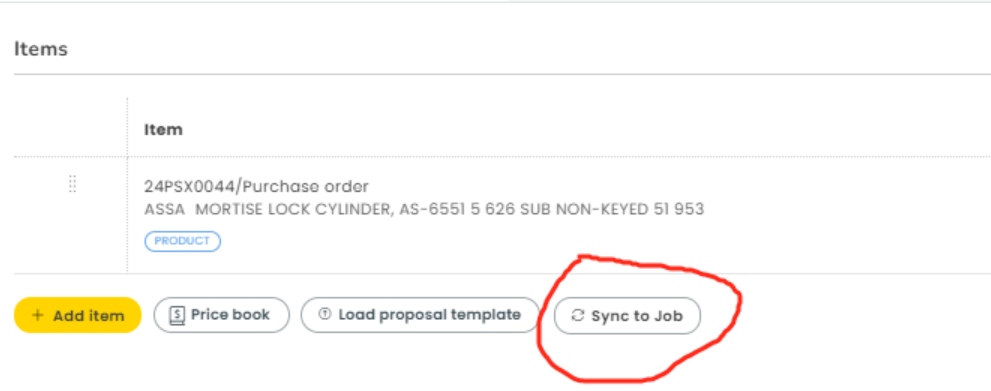
Go to "Estimate" and click "Sync to Job"


In the result we will have items from the estimate transferred to the job items.
-
Go to attachments field and click on "Add New":

-
Click on the estimate for a specific state the request is for. In our case it’s "CT/GOV/ESTIMATE";

When choosing a created document, we will have the right template of the estimate/invoice that has to be sent to the client.

-
Download this document;

-
Send them through an email as well with a JOB ID for this estimate:

When an estimate is approved, they send an email to our email. Once we have it, download the very first file they sent and attach it to the job. (check the screenshot below)

Here is an example of how it looks like:

Purchase Order Number (in a circle shown above) has to be filled in in an appropriate Job field C PO/VPO:

-
Now we need to order the parts. To request ordering these parts, we go to the Logistics Order Tracking. (article ‘How to get Quotes and Parts’)
After the request is successfully completed, we need to send an invoice:
-
Go to the attachments field and click on ‘Add New’
-
Download an invoice template (according to the State) and send it through the email.
State Of Alabama Contract request handling process
We also mostly receive requests through the email, here how one of those looks:


Before replying to the email, create the job for the client ⬇️
-
Find this client in the system (check the signature of the email by State/Contract);
-
Create the job from the client;
-
Attach a tag “MANAGER ONLY GOV.JOB”;
-
Job Type: PLATINUM CONTRACTS;
-
Service Area: Platinum + state accordingly;
-
Job Source: Platinum + state accordingly;
-
C PO/VPO: Purchase Order Number (PO) has to be filled in in an appropriate Job field (below the job notes).

-
Point of Contact can be indicated on email like this, or on the Work Order you can also find their number/email.
-> This is a designated person to whom we call in case we have questions or want to schedule an appointment.

- Reply with a template:
‘Good morning,
That is totally not a problem. Could you please clarify whether it is an emergency request or do you want us to provide you with the quote prior to completing the service?
Your reference number [Job ID]’ -
If it is not an emergency request they usually want a quote in advance:
-> We need pictures in order for a technician to make an accurate quote. For pictures, we can also reach a point of contact or send technicians to the job-site to get the pictures.
After assessment, get on a daily call with Daniel Szender/Dustin DOP to start the quotation process. (if needed)
Once all the estimates for the client are done, follow these steps:
-
Sync estimate to job;
-
Create a document through attachments and send by an email;
-
Click on the estimate for a specific state the request is for. In our case it’s ALABAMA GOV. WORK ORDER ESTIMATE’
-
Download a document;
-
Include the pictures from the assessment and send it through an email.

Here is an example of an Approval email

After getting an approval, we get in touch with Daniel Szender to check if necessary parts need to be ordered or if the technician already has these parts to complete the job.
-> If you need to order the parts follow the procedure described in an article ‘How to get Quotes and Parts’
Once we have all parts, we can reach them by email/call to schedule an appointment.
After the job is successfully completed, we need to send an invoice:
-
Go to the attachments field and click on "Add New"
-
Download an invoice template (according to the State) and send it through the email.
City OF AUSTIN Contract request handling process
This contract includes many locations/departments that we take care of:

We mostly receive requests through the email (they can also contact us by call):

Before replying to the email, create the job for the client ⬇️
- Find this client in the system (check the signature of the email: State/Contract);
-
Create the job from the client:
-
Attach a tag “MANAGER ONLY GOV.JOB”;
-
Job Type: PLATINUM CONTRACTS;
-
Service Area: Platinum + state accordingly;
-
Job Source: Platinum + state accordingly;
-
We put the name of the person that requested a quote and his email;
-
In Tech Notes: indicate the issue they describe + extension of a point of contact person;
-
Purchase Order Number has to be filled in in an appropriate Job field C PO/VPO.


We need to always clarify if it’s an emergency request or a quote request. The difference is:
- emergency request - estimate in advance is not needed, just send a technician and have him call the client to inform he is heading their way.
- non-emergency - we have to get pictures (if not provided) to create an estimate and send them for approval/ or send technicians for assessment.
-
Reply with a template:
‘Good morning,
That is totally not a problem. Could you please clarify whether it is an emergency request or do you want us to provide you with the quote prior to completing the service?
Your reference number [Job ID]’
❗️Note: Austin Energy Department is not charged for a service call!
After the job is successfully completed, we need to send an invoice.
-
Download an invoice template (according to the State);

-
Send to both emails:
-
person who requested AND bsdapinvoices@austintexas.gov
-> Austin Library and to the person who requested: LIB.AP@austintexas.gov
-> Austin Energy and to the person who requested: fminvoices@austinenergy.com
-> Fleet Mobility and to the person who requested: ServiceCenter8DL@austintexas.gov
Illinois Tollway Contract request handling process
Follow the same procedure of requests handling and job creation/estimate and invoicing as we described above. Here is an extra info you have to know:
-
Communication only through the email;
-
In most cases they request:
-> parts (purchase order);
-> services related to Doors. -
To quote the job: contact Daniel Szender.
Health and Human Services Austin/Houston request handling process
Follow the same procedure of requests handling and job creation as we described above. Here is an extra info about invoicing you have to know:
-
How to send the invoice to HHSC (Health and Human Services)
Follow the same procedure of the downloading invoice, but pay attention to the signature of the person who requested it. The Service Region is indicated there, so it is a hint for us to which email you should send the invoice, see an example:

- For Region 06, accounts payable email: Reg_06_Regional_Budget_PRF@hhs.texas.gov
- For Region 04, accounts payable email: Reg04_Admin_Services@hhs.texas.gov
Follow these instructions and everything will go smoothly.
Do not hesitate to ask any questions, the manager will always be there to help.